Paint to Get Rich Prestige Guide
Requirements, what resets, how to prepare, and how Prestige unlocks Museum World 2.
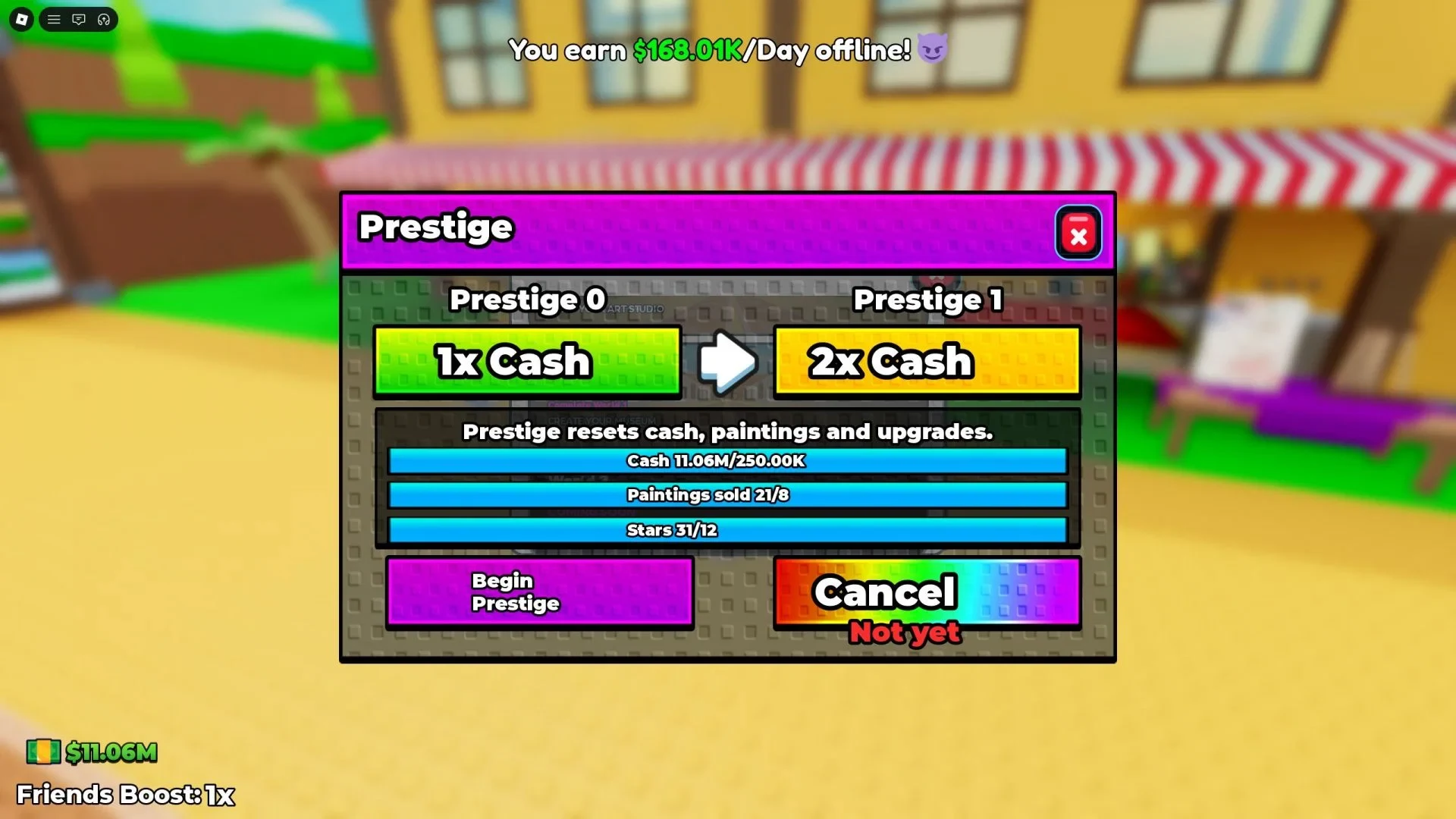
Prestige is the rebirth-style reset at the heart of Paint to Get Rich. You trade a finished Artist Alley run for a permanent Cash multiplier and progress toward later worlds such as The Museum. This guide explains the live requirements, exactly what disappears, how to prepare, and how Prestige ties to World 2.
If you are still learning the paint → sell loop, finish Getting Started and How to Sell before your first Begin Prestige click.
What Prestige is (and is not)
Prestige is not a soft prestige toggle or a temporary boost menu. When you confirm the reset:
- You keep a stronger long-term Cash earnings multiplier.
- You lose the current run’s studio power and inventory of work.
- You move Prestige progression forward, which players use to reach new worlds.
It is closer to a classic Roblox tycoon rebirth than to a daily login streak.
Prestige requirements — always read the live menu
Open the Prestige button on the left-side UI. The panel shows three separate requirement lines:
- Cash earned / held toward the listed total
- Paintings sold toward the listed count
- Stars collected toward the listed total
Toasty Works does not publish a single permanent number for all seasons in a public design doc. Use the amounts on your screen. Guides that invent fixed totals go stale the moment a patch retunes the panel.
Tips while filling the meters:
- Stars come from appraisal quality—paint deliberately, not only quickly.
- Sold count only moves when you finish a Sell; displayed but unsold work does not count.
- Cash spending on upgrades still supports future sales, but dumping every last dollar on cosmetics can leave you short of a Cash line if the menu tracks a high threshold—verify how your current panel reads before a huge purchase.
How to start Prestige
- Confirm all three live lines are complete.
- Click Prestige on the left to open the menu.
- Press Begin Prestige.
- Read the confirmation warning carefully.
- Accept only when you are ready for the wipe.
- Watch the short cutscene; your run then resets with the new multiplier.
Never mash confirm while an auction bid or negotiation is mid-flight. Finish active sales first.
What resets on Prestige
Expect to lose:
- Current Cash balance from the run
- All studio upgrades (the ~33 Artist Alley pads you bought)
- Paintings you created
- Hired artists / NPC painters
- Archive progress tied to the current run
What you keep
- Permanent Cash multiplier (stacks with future Prestiges as the system allows)
- Account-level badges progress such as Fresh Canvas on the first Prestige
- Knowledge of the loop, auction timing, and negotiation habits
Because upgrades vanish, late cosmetics are usually a poor buy when the Prestige button is already glowing. Spend rules: tier list.
How to prepare before Begin Prestige
Sales and counters
- Sell or auction every piece you still need counted toward paintings sold.
- Prefer finishing high-Star work if the Stars meter still needs a nudge.
- Check the auction house cooldown—if a five-minute window is seconds away and you hold a masterpiece, you may want that Cash/Stars before resetting.
Studio and artists
- Stop pouring Cash into vanity pads.
- Remember hired artists disappear; do not expand payroll right before a reset.
- Take a mental note of which S-tier pads you will repurchase first after the wipe.
Mindset check
Ask:
- Is the multiplier worth losing this studio right now?
- Am I Prestiging to unlock world progress, or only because the button is available?
- Do I have time in this session to rebuild the early loop comfortably?
If you only have five minutes left to play, consider waiting—post-Prestige studios feel empty until the first upgrades return.
Prestige and World 2 Museum
Players report that World 2 / The Museum unlocks around Prestige 3. The official listing advertises W2 / The Museum, and the Museum Bound badge confirms the destination. The badge itself may not print the numeric threshold, so treat Prestige 3 as the community route and trust any newer in-game unlock prompt if it differs.
Planning tips:
- Prestige 1 teaches the wipe; aim for clean prep and claim Fresh Canvas.
- Prestige 2 is often a faster rebuild thanks to the multiplier.
- Prestige 3 is where many players finally open Museum content—read Museum / World 2 before that climb so you know what changes.
Future weekly worlds will likely also gate through Prestige-style progression. Watch the Updates Hub.
Prestige versus scripts and codes
Auto Prestige features appear in third-party script ads. They can fire the reset the instant meters fill, destroying auction-ready work. This wiki does not provide exploit code; see Scripts for risk notes.
Codes will not replace Prestige requirements. As of October 2026 there are no active codes. Even a future Cash gift would only help fill meters—you still confirm the wipe yourself.
After the reset — first rebuild steps
- Paint and sell manually to seed Cash with the new multiplier.
- Repurchase S-tier canvas, stand, and attraction pads first (tier list).
- Reopen auction access when income is stable.
- Re-hire artists only as light B-tier help.
- Glance at Prestige meters early so the next reset is intentional, not a surprise.
Common Prestige mistakes
- Confirming without reading the three live totals
- Forgetting unsold stands that still needed to count as sold
- Buying expensive cosmetics minutes before Begin Prestige
- Expecting NPC artists to finish Stars for you
- Prestiging mid-auction and missing a premium payout
- Assuming Museum unlocks at Prestige 1
Related guides
Prestige is the long-term engine of Paint to Get Rich. Treat Begin Prestige as a planned trade: temporary studio loss for permanent Cash power and the road into the Museum.
Frequently Asked Questions
Quick answers to the most common questions.
What are the Paint to Get Rich Prestige requirements?
Open the live Prestige menu. It lists Cash, paintings sold, and Stars totals for your current reset. Use those numbers—not an outdated fixed guide value.
What does Prestige reset?
Cash, studio upgrades, paintings, hired artists, and archive progress. You keep the permanent Cash multiplier.
How do I Prestige?
Fill the three live lines, open Prestige on the left, press Begin Prestige, and confirm the warning. A short cutscene plays, then the run resets.
How many Prestiges unlock World 2?
Players commonly report Museum World 2 at Prestige 3. Follow in-game unlock text if Toasty Works changes the threshold.
Should I hire artists before Prestige?
Only lightly. Artists reset with the run and are weak for filling Prestige meters compared with your own sales.