Getting Started in Paint to Get Rich
First canvas to first upgrades — the paint, sell, and studio loop explained for new Roblox players.
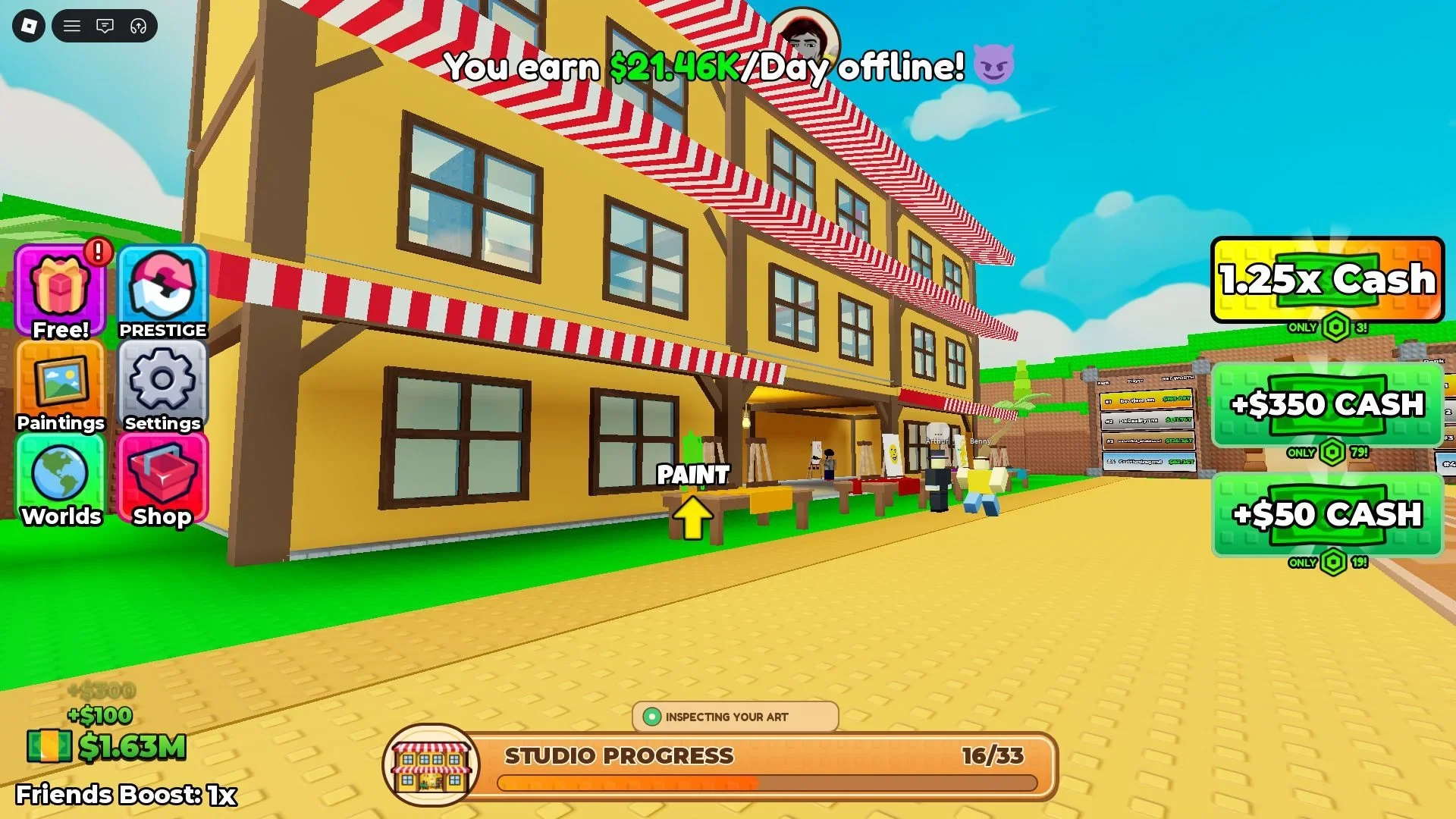
Welcome to Paint to Get Rich, the Roblox tycoon from Toasty Works. Your job is simple to say and rich in detail: paint canvases, earn Stars from appraisal, put work on display, negotiate Cash, and step on green buttons to grow Artist Alley. This beginner guide covers controls, the first sale, early upgrade order, and when to look at Prestige or the Museum.
Play link: Paint to Get Rich on Roblox.
What you will do in the first hour
- Learn PC controls and find your starting canvas.
- Finish a painting and read the appraisal / Stars result.
- Place the piece on a display stand.
- Negotiate a buyer offer and Sell.
- Spend Cash on the cheapest green upgrades that unlock more painting power.
- Repeat until the studio feels busy, then skim Prestige and auction goals.
There are no active promo codes as of October 2026—progress comes from the loop itself. See the Codes Hub if that changes.
PC controls
| Key | Action |
|---|---|
| WASD | Move around the studio |
| Space | Jump |
| E | Interact with stands, buttons, and props |
| Left Mouse Button | Paint on the canvas |
Hold or stroke with LMB until the canvas completes. If a prompt appears, press E. Full reference: Controls & Wiki.
The money loop, step by step
1. Paint the canvas
Walk to an easel or canvas pad in your plot. Use LMB to paint. Early pieces will not be masterpieces—that is fine. Completing volume teaches timing and gets Cash flowing.
2. Appraisal and Stars
After a piece finishes, the game appraises it. Higher grades yield more Stars, which matter later for Prestige requirements. Treat Stars as a quality score you accumulate, not as spendable Cash.
3. Display stand
Move the finished painting onto a display stand so buyers can see it. If you lack stands, buy the green unlock pads that add them. Bottlenecked stands are a common early slowdown.
4. Buyer offer and negotiation
Collectors arrive with offers. Do not smash accept on every lowball. Small patience during negotiation often raises Cash per canvas. Deep tips live in How to Sell Paintings.
5. Spend Cash on green buttons
Cash exists to be spent on studio upgrades—about 33 pads totaling several million across a full Artist Alley build. Early on, prioritize throughput: better painting tools, stands, and attraction upgrades. Follow the upgrade tier list so you do not blow funds on cosmetics first.
Early upgrade advice
Buy soon
- Canvas / quality pads that improve Stars potential
- Extra display stands
- Basic attraction upgrades that bring stronger buyers
Buy later
- Deep hired artist trees (NPCs are weak for Prestige grinding — Players hub)
- Pure cosmetic rooms you will lose on Prestige anyway
- Expensive end-chain pads before your loop is stable
When the path to the third floor opens, plan for the auction house. Auctions run about every five minutes—save your best paintings instead of dumping everything on the first street buyer.
Prestige on your radar (do not rush blindly)
Prestige is the rebirth-style reset. The left-side menu shows live requirements for Cash, paintings sold, and Stars. Meeting them unlocks Begin Prestige, which wipes run progress and keeps a Cash multiplier. Players also use Prestige to climb toward World 2 / The Museum (commonly reported at Prestige 3).
Before your first reset, read the full Prestige guide. Finish sales you want counted, avoid last-second vanity upgrades, and accept that artists and paintings disappear.
World 2 Museum — why beginners should care early
You will not unlock the Museum on day one, but knowing it exists shapes how you spend. Artist Alley teaches the loop; Museum is the advertised W2 destination with the Museum Bound badge. Overview: Museum / World 2. Weekly worlds beyond W2 are planned—track them on Updates.
Beginner mistakes to avoid
- Accepting every offer without negotiation
- Hiring artists before stands and canvas upgrades
- Selling masterpiece-tier work instantly instead of waiting for auction
- Prestiging the moment the button lights up without reading what resets
- Downloading Auto Paint scripts from random sites (Scripts Hub explains the ban risk)
- Chasing fake codes on phishing pages
Suggested first-session checklist
- Complete at least several full paint → sell cycles manually
- Unlock a second display stand
- Negotiate at least one offer upward successfully
- Skim the Prestige menu so you know the three meters
- Bookmark Guides, Tier List, and Codes
- Decide whether tonight is for grinding Cash or learning auction timing
What to read next
- How to Sell Paintings — Stars, grades, negotiation
- Tier List — green button priority
- Auction House — five-minute premium sales
- Prestige — reset prep
- Museum World 2 — after Prestige climbs
Paint to Get Rich rewards attention more than spam. Master the first loop cleanly and every later system—artists, auctions, Prestige, Museum—slots into place without confusion.
Frequently Asked Questions
Quick answers to the most common questions.
How do I make money in Paint to Get Rich?
Paint a canvas, place it on a display stand, negotiate the buyer offer, Sell for Cash, then spend Cash on green studio upgrades.
What are the PC controls?
WASD to move, Space to jump, E to interact, and left mouse button to paint.
Should I Prestige in my first session?
Only if the live Prestige menu requirements are met and you accept a full run reset. Most new players should learn selling and upgrades first.
Are there beginner codes?
No confirmed active codes as of October 2026. Check the Codes Hub after updates.
When do I unlock the Museum?
World 2 Museum is commonly reported at Prestige 3. Follow in-game unlock text if it differs, and read the Museum guide before that climb.